Art Mate Together: How to Draw
- 0.0
- Rating
- 10.00K
- Installs
- Free
- Price

 Analysis by App-foxy
I approached Art Mate Together as a casual drawing companion rather than a full professional art studio, and that distinction matters. Its focus is social drawing, tracing, and friendly challenges with people around the world, so the experience feels closer to practicing together than building a polished illustration from scratch. I found that the app makes the most sense when I give myself a small, clear task: trace a reference, sketch alongside another player, or use a short session to loosen up before working on something more serious.
It belongs to the Art & Design category, is free to use, and is suitable for everyone. Ahc Foundation Inc is the developer, and the app has passed the early adoption stage with over ten thousand installs. The current version is 1.0.8, and it runs on devices using Android 7.0 or newer. Those details make it approachable for people who want to try collaborative drawing without first committing to a subscription or a complicated creative suite.
How I use Art Mate Together from a first sketch to a repeatable routine
I start with a small, repeatable task so the first sketch feels approachable rather than like a test. From there, I use tracing to warm up, then choose a shared activity or challenge when I want a little more momentum; that progression gives each session a purpose and makes it easier to notice what I’m practicing.
You May Also Like

 AccuWeather: Weather Radar
AccuWeather Review: A Quick, Clear Forecast for Everyday Decisions
For everyday plans, the best forecast is the one you can understand quickly. AccuWeather makes rain timing, radar, and local conditions easy to act on, with a few trade-offs.

 Hill Climb Racing
Why Hill Climb Racing Still Turns Crashes Into One More Run
A tiny car, a bumpy hill and one more upgrade: Hill Climb Racing keeps resurfacing because its simple chaos makes every near-miss feel personal.

 AliExpress - Shopping App
AliExpress Makes Global Shopping Feel Personal, but Shoppers Bear the Risk
AliExpress turns a global marketplace into a pocket-sized discovery engine. Its reach is useful, its shopping loop compelling, and its trade-offs easy to miss.

 Lords Mobile: Kingdom Wars
Lords Mobile Is a Kingdom-Building Routine, Not a Quick Match
A case-by-case verdict on the building, battles, device demands, and social commitments that make Lords Mobile rewarding for some players and exhausting for others.

 PDF Scanner app - TapScanner
TapScanner Makes Paperwork Easier to Capture, Check, and Share
TapScanner makes scanning with a phone feel less like a rescue operation and more like a dependable step in getting work done. Its capture tools are useful, though not flawless.

 Block Blast!
Block Blast! Shows How Much a Puzzle Game Can Leave Out
A quiet grid game shows why puzzle players increasingly value instant clarity, repeatable skill and low-pressure play—and where the genre still needs to catch up.
More From Our News Desk
View All News


The baseline workflow is deliberately simple
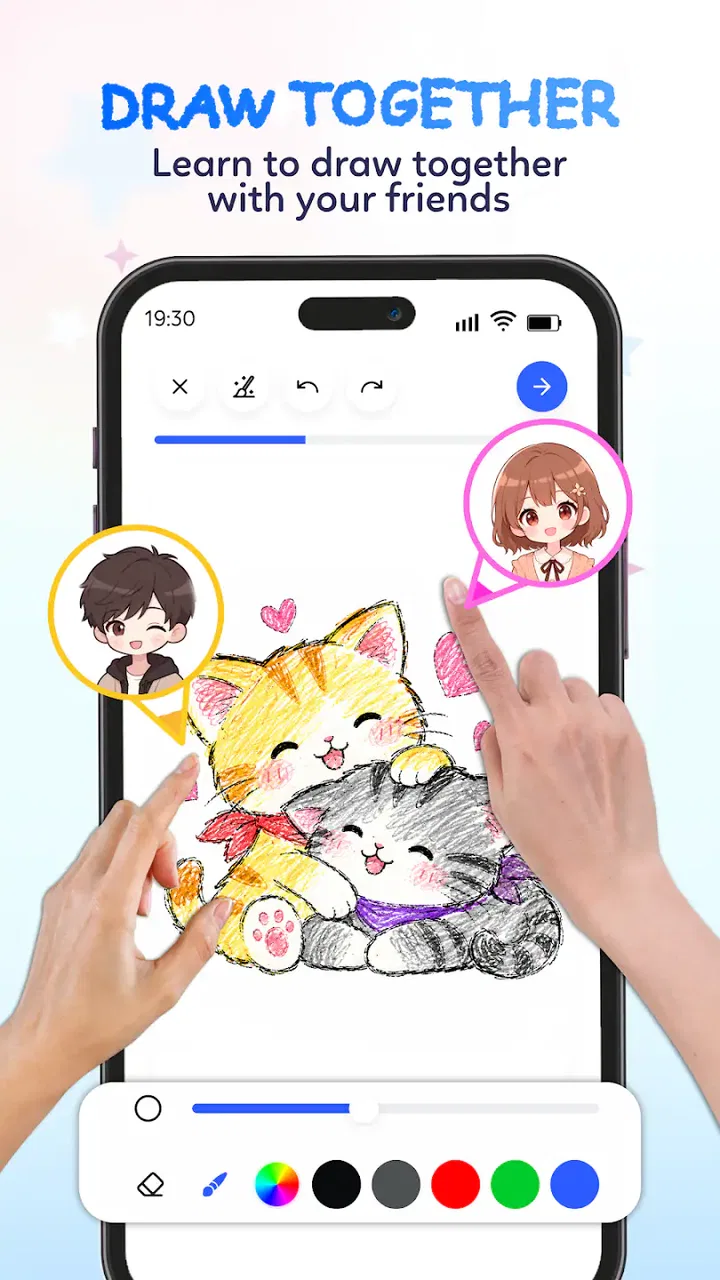
My usual session starts with a quick decision: am I here to trace, draw freely, or take part in a challenge? That choice keeps the app from becoming aimless. Tracing is the easiest entry point because it gives the hand something to follow. Drawing together is more open-ended, while challenges add a little pressure and make the session feel less like private practice.
The first useful habit is to treat each attempt as a study rather than a finished artwork. I pay attention to the order of lines, the size of shapes, and the points where my hand becomes uncertain. This approach works especially well for beginners, because the goal is not to produce a perfect picture immediately. The goal is to notice what becomes easier after repeating the same kind of movement.
A realistic everyday use case is a short evening break after work or school. I can open the app, choose a simple drawing activity, and spend a few minutes following lines instead of scrolling through unrelated content. The social element gives the exercise a little more energy than a solitary sketchbook, while the drawing itself remains light enough for a short session.
I also like using it as a warm-up before opening a more advanced drawing application. A quick tracing exercise gets my hand moving without forcing me to decide on a large canvas, brush system, or finished concept. Once I feel comfortable, I can move to a dedicated illustration tool for layers, detailed editing, typography, or export work.
What makes the social side useful
The worldwide challenge angle changes the mood of the app. Even when I am not trying to win anything, drawing with or against other people gives me a reason to finish a small task. That is valuable for users who struggle with the blank-page problem. Instead of waiting for inspiration, I can respond to the activity in front of me.
There is also a useful difference between copying a reference alone and tracing while participating in a shared activity. The latter makes me more aware of pace and clarity. I begin to simplify my strokes and avoid spending too long on tiny details. That is a good lesson for beginners, because controlled, confident marks usually matter more than excessive correction.
Still, the social format will not suit everyone. If you want a quiet drawing application with no competitive or shared element, a conventional sketchbook app may feel calmer. Likewise, artists who need complete control over their workspace may find the guided nature of this experience restrictive. I see the collaboration as the reason to choose this app, not as an extra feature that every artist will automatically appreciate.
Settings worth checking before drawing seriously
I recommend spending a moment looking through the available controls before starting a challenge. Even in a simple drawing app, small adjustments can affect how comfortable the session feels. Check the drawing area, the way the reference is presented, and any options that influence how you move between a prompt and your marks. The best setup is the one that lets you look at the example without constantly losing sight of your own work.
On a smaller phone, I prefer shorter drawing gestures and a simpler subject. A crowded reference can make the screen feel cramped, especially when my finger covers part of the image. On a larger display, I can work with more deliberate movements, but I still avoid zooming or repositioning repeatedly unless the activity clearly requires it. Extra movement interrupts rhythm and makes tracing feel harder than it needs to be.
My most important setup tip is to remove friction before the first line. Hold the device in the position you expect to keep throughout the activity, clean the screen if your finger is dragging, and decide whether you are aiming for speed or accuracy. These are ordinary habits, but they have a noticeable effect when the app is being used for repeated practice rather than a single novelty session.
It is also worth checking how comfortable the app feels on your particular device before inviting somebody else to join. The minimum operating system is Android 7.0, which keeps the compatibility range fairly broad, but the practical experience still depends on screen size and touch responsiveness. A drawing activity that feels precise on a tablet may feel more cramped on an older phone.
Faster patterns that improve repeat sessions
After a few attempts, I stopped treating every drawing as a fresh event and started using repeatable patterns. First, I scan the reference for its largest shapes. Then I mark the general direction of the subject with a few broad movements before worrying about smaller features. This prevents me from polishing one corner while the overall drawing is still out of proportion.
A second pattern is to separate observation from correction. I try to complete a section before immediately undoing or redrawing it. Constantly fixing the last stroke makes me hesitant, and hesitation is especially noticeable in a shared or timed activity. Waiting until a larger section is complete gives me better information about whether the problem is truly local or part of a broader proportion issue.
For tracing, I use a light mental map: outer contour first, internal divisions second, distinctive details last. This order is more reliable than chasing the most interesting detail at the beginning. It also makes the exercise transferable to ordinary sketching, because I am learning to construct the subject instead of merely decorating it.
For free drawing, I set a narrow goal before beginning. I might focus on clean curves, balanced spacing, or completing a recognizable silhouette. A narrow goal makes the session measurable without needing a formal score. When I repeat the same goal across several attempts, I can tell whether my hand is becoming steadier or whether I am simply rushing.
For challenges with other players, I favor clarity over complexity. A simple, readable drawing is more satisfying to complete than an ambitious one that runs out of time or attention. This is one of the app's less obvious lessons: social drawing rewards communication through shapes. The result does not need to be elaborate if the main idea is easy to understand.
How experienced users can build a practical routine
I would suggest a three-stage routine for anyone who expects to use the app regularly. Begin with tracing to settle your hand, move to a shared drawing or challenge to test speed, and finish with a freer sketch that applies one thing you noticed. This sequence gives each part of the app a purpose instead of turning the session into random tapping.
Another useful habit is to keep the subject difficulty consistent for a while. If every attempt uses a different level of complexity, it becomes difficult to tell whether you are improving. Repeating a similar kind of task lets you compare your line confidence, spacing, and completion time in a personal way, without needing to rely on a public ranking.
I also recommend stopping before fatigue turns into frustration. Finger drawing becomes less precise when the hand is tired, and a social challenge can make users feel obliged to continue. Short, focused sessions are better here than long marathons. The app is strongest as a regular practice tool, not as a replacement for a full drawing workstation.
Parents and younger users may appreciate the Everyone content rating and the straightforward creative premise. I would still encourage adults to stay aware of the social context whenever a child is interacting with people worldwide. The drawing activity itself is accessible, but shared spaces always deserve sensible supervision and age-appropriate device habits.
Where the app reaches its advanced limits
The biggest limitation is that collaborative drawing and tracing are not the same as professional illustration. I would not choose this app for complex layer-based artwork, detailed color correction, advanced brush customization, or a carefully prepared portfolio piece. When the job depends on precise editing and a controlled production workflow, a dedicated art application is the better tool.
There is also a trade-off between guidance and freedom. References and challenges help me begin quickly, but they can narrow the kind of creative decision-making I am practicing. If I want to design a character from a blank canvas, develop a painting over many stages, or experiment with a highly personal visual style, I need a more open environment.
The social format can introduce another kind of friction: my attention is divided between drawing and the presence of other participants. That can be motivating, but it can also make me rush. I get better results when I decide in advance whether the session is about learning a technique or simply enjoying the interaction. Trying to do both at maximum intensity usually weakens both.
Free access is a strong reason to try it, but it should not be confused with unlimited professional capability. Art Mate Together is valuable because it lowers the barrier to starting a drawing session. Its value is less obvious once the task requires extensive editing, a large project structure, or a highly specific output. Knowing that boundary prevents disappointment.
Who should install it, and who should choose something else
I would recommend it to beginners who want a friendly reason to draw, families looking for a simple creative activity, and casual artists who enjoy learning through repetition. It is also a good fit for someone who owns a basic Android device and wants an accessible way to practice without paying upfront. The combination of tracing and shared challenges gives the app more direction than a completely blank sketchpad.
It is less suitable for an illustrator who already depends on layers, professional brushes, detailed canvas controls, or a carefully managed export workflow. It may also disappoint users who dislike social interaction and only want a private, distraction-free drawing space. In those cases, a conventional sketching app or a desktop art program will offer better control.
The best comparison is not between this app and a full studio suite, because they solve different problems. A standard drawing app gives me more freedom and technical depth. Art Mate Together gives me a prompt, a shared context, and a reason to complete a small exercise. I would keep both types of tools available rather than expecting one to replace the other.
My verdict after building a habit with it
Art Mate Together works when I use it for what it is: a lightweight Art & Design app built around drawing with others, tracing, and global challenges. Its strongest quality is not advanced production power but the way it turns “I should practice drawing” into a concrete activity I can start immediately. That makes it easier to build consistency, especially for people who lose motivation when faced with a blank canvas.
I would begin with the free version, use short sessions, and follow a repeatable order of tracing, shared activity, and personal sketching. I would also keep expectations realistic about the drawing controls and move to a dedicated application whenever the work becomes technically demanding. That combination lets the app stay useful instead of asking it to perform a job it was not designed to do.
For me, the final decision is straightforward: choose it if the social element makes you more likely to draw, and skip it if you need a private professional workspace. The current release, 1.0.8, presents a focused idea rather than an all-purpose art package. For casual practice and creative participation, that focus is a strength. It is a good starting point for making drawing a habit, not a substitute for mastering a complete digital art workflow.
FAQs for Art Mate Together: How to Draw
01What is Art Mate Together: How to Draw?
Art Mate Together: How to Draw is a drawing and learning app designed to make art practice more interactive. It provides guided drawing activities, visual references, and step-by-step support that can help beginners understand shapes, proportions, outlines, and basic coloring. Rather than functioning only as a blank digital canvas, the app focuses on helping users follow lessons and gradually build confidence while creating their own illustrations.
02Is Art Mate Together: How to Draw suitable for beginners and children?
The app is mainly aimed at beginners, including children and casual users who want an easy way to start drawing. Its guided approach makes individual steps less intimidating than beginning with a completely empty page. However, younger children may still need supervision, especially when using in-app purchases, advertisements, or device-sharing features. Parents should also review the available content and privacy settings before allowing independent use.
03Does Art Mate Together: How to Draw require an internet connection?
Some parts of Art Mate Together: How to Draw may work without a constant internet connection once the necessary content has been loaded, which is useful for practicing while traveling or away from Wi-Fi. Nevertheless, internet access may be required for downloading lessons, updating the app, displaying advertisements, synchronizing progress, or accessing online features. Availability can vary by device version, so testing the desired lessons offline is recommended.
04Is Art Mate Together: How to Draw free to download and use?
The app may be available as a free download, but users should check the store listing carefully because free access does not always mean that every feature is included. Certain lessons, tools, content packs, or ad-free options may require in-app purchases. Before downloading, review the payment information, subscription terms, and cancellation rules shown in Google Play or the App Store, particularly if children will use the device.
05What devices are compatible with Art Mate Together: How to Draw?
Art Mate Together: How to Draw is intended for mobile devices running a supported version of Android or iOS, depending on the edition available in your region. Compatibility can change after operating-system updates, so the official store page should be checked before installation. A device with a reasonably sized screen is preferable because drawing guides and small interface controls can feel cramped on older phones or very compact displays.
Pros
- Simple interface makes it easy for beginners to start drawing together.
- Collaborative drawing can make practice more social and enjoyable.
- Useful for sharing sketches and creative ideas with friends.
- Lightweight design should run smoothly on many modern devices.
- Suitable for short drawing sessions without a steep learning curve.
Cons
- Advanced artists may find the available tools and brushes limited.
- A stable internet connection may be needed for shared drawing features.
- Small screens can make detailed collaborative artwork difficult to manage.
- The experience may depend on having friends available to join.
- Some features or content may require in-app purchases or ads.

Art Mate Together: How to Draw
Gallery